For Pascal, Blaze & Sonance amplifiers
Made in GermanyAutomatic audio scheduling for multi-zone amplifiers
The ESP Audio Scheduler switches the zones of up to four amplifiers on and off, fades volume and swaps inputs on a weekly schedule — entirely on its own. No PC, no app, no cloud subscription. Set it up once from any browser, then it just runs.
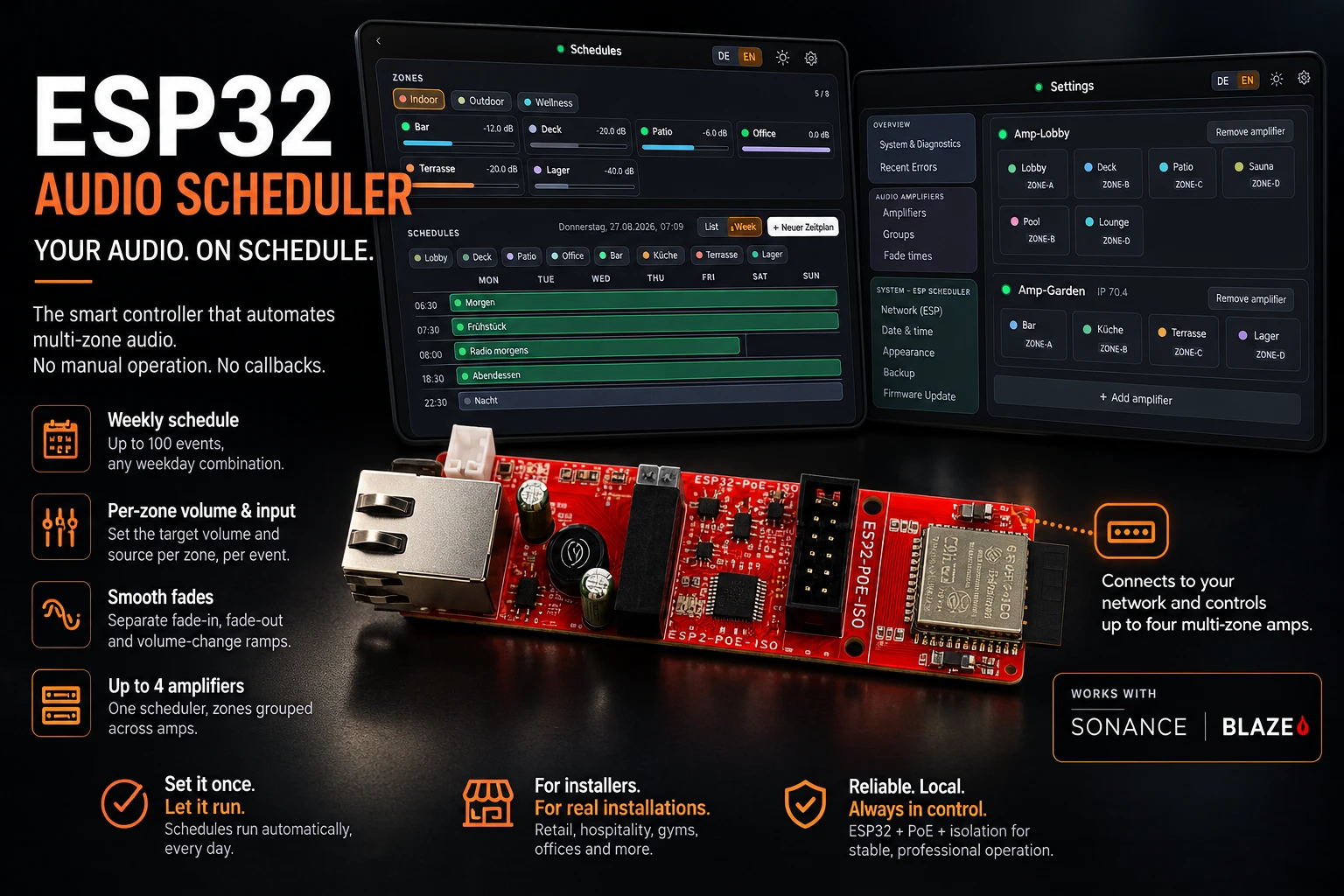
- PoE 802.3af
- 10/100 Ethernet
- Up to 4 amplifiers
- Up to 8 zones each
- 100 events
- mDNS discovery
- NTP clock
- OTA updates
Where it runs
Built for installers who don't want a callback
If you install or run a Pascal, Blaze or Sonance multi-zone amplifier, the ESP Audio Scheduler is the piece that turns a manually-operated system into one that runs itself — a small box on the same network as the amps, no ongoing maintenance.
07:00 → 22:30
Retail & hospitality
Background music that turns on when the doors open and off when the last shift locks up — every zone, every day, without anyone touching a switch.
06:00 → 23:00
Gyms & studios
Different volume and input per class block or time of day, synced across every zone in the building.
Mon–Fri, 08:00 → 18:00
Offices & lobbies
Quiet paging during business hours, silence after hours, fading in and out instead of hard cuts.
Setup
Three steps, then never again
- 01
Connect
Plug the scheduler into the same network as your amplifiers. PoE powers it over the same cable; without a PoE switch, a 5V USB supply works too.
- 02
Configure in the browser
Open the built-in web UI, let it auto-discover your amplifiers (up to four), and build your weekly schedule: time, days, zones, volume, input.
- 03
It runs itself
The device keeps its own clock via NTP and fires every event from then on — no computer, no app, no cloud. New firmware is reported in the web UI and installed with one click.
Capabilities
Everything you need, nothing you don't
Weekly schedule, up to 100 events
Any weekday combination, minute-precise trigger times.
Per-zone volume & input
Set the target volume and source per zone, per event.
Smooth fades, not hard cuts
Separate fade-in, fade-out and volume-change ramps.
Up to four amplifiers
One scheduler runs up to four Pascal, Blaze or Sonance amps, found on the network via mDNS.
Zone groups & colors
Group zones across amplifiers, color-coded for fast orientation in every view.
CSV export & import
Back up or restore the entire schedule as a spreadsheet; the full backup also keeps amplifiers and groups.
NTP clock
Sets itself from the internet, DST included — or set it manually if there's no internet.
One-click firmware updates
Reports new versions and installs only when you click — with rollback protection if one fails to boot.
The web UI
Served by the device itself
No installer, no account, no vendor portal. Open it from a phone, tablet or PC on the same network.
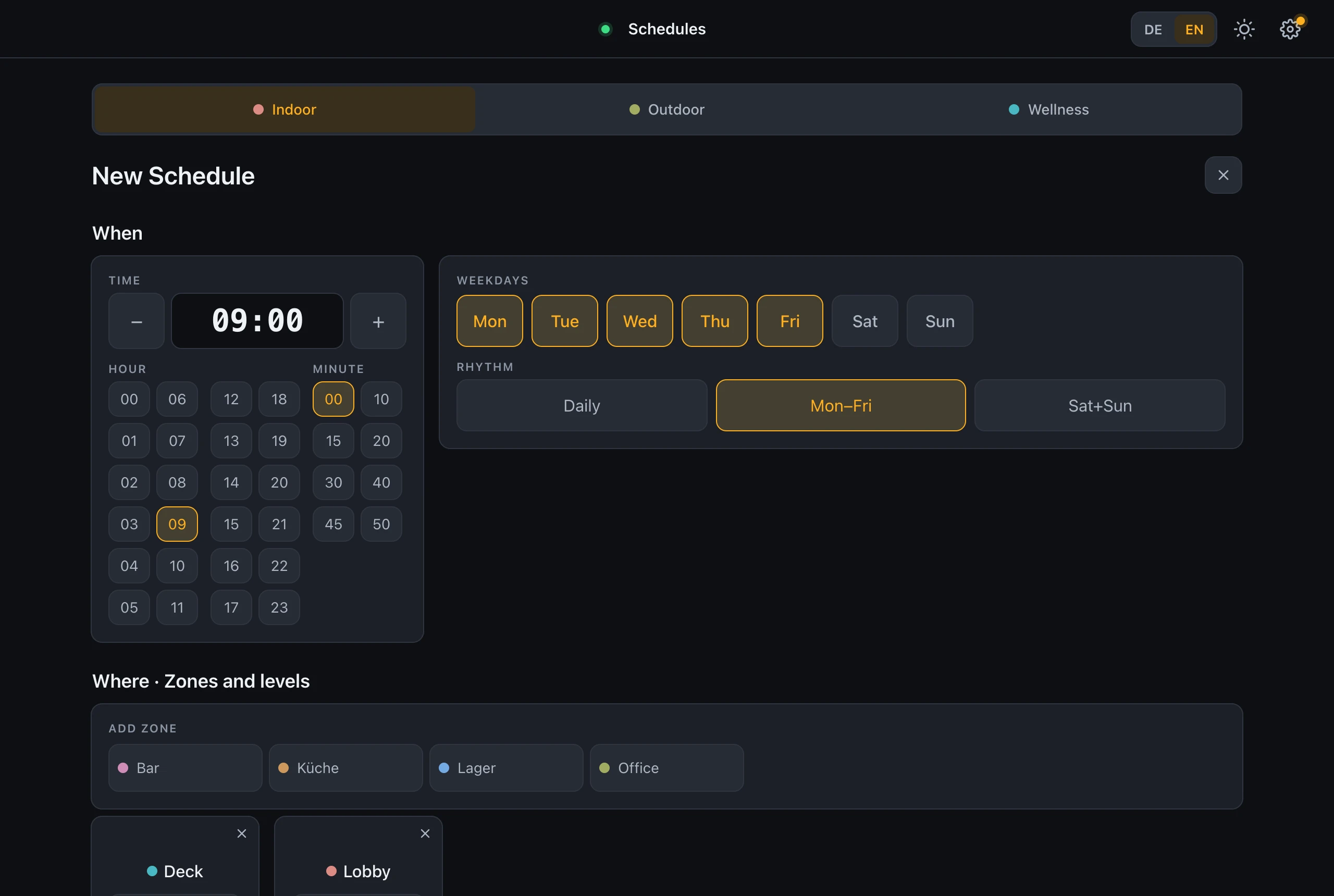
Event editor
When, where and what — time, weekdays, zones, volume and input in one clear layout.
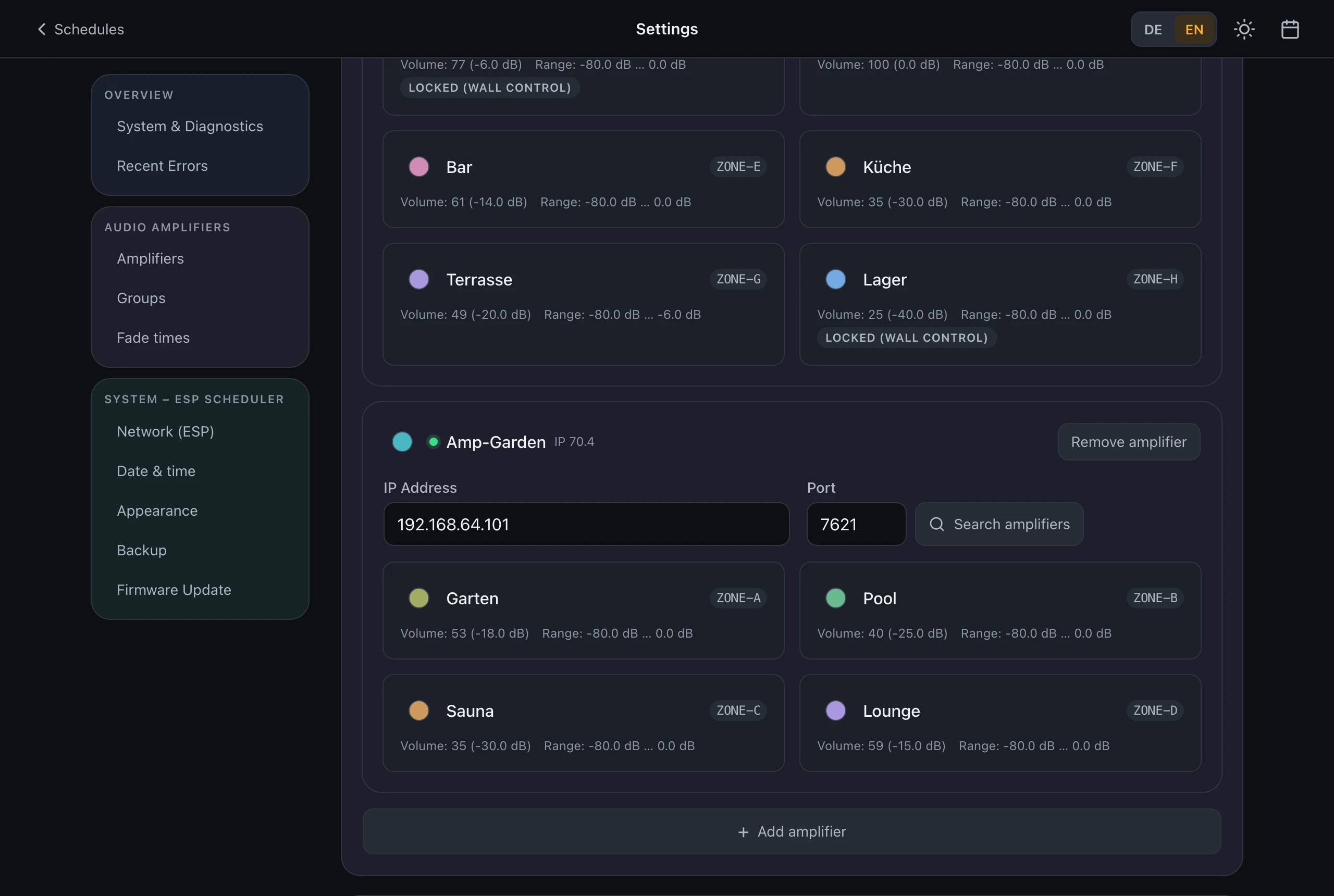
Up to four amplifiers
Each amplifier gets its own card with its zones, live volume and dB range — including zones locked to a wall panel.
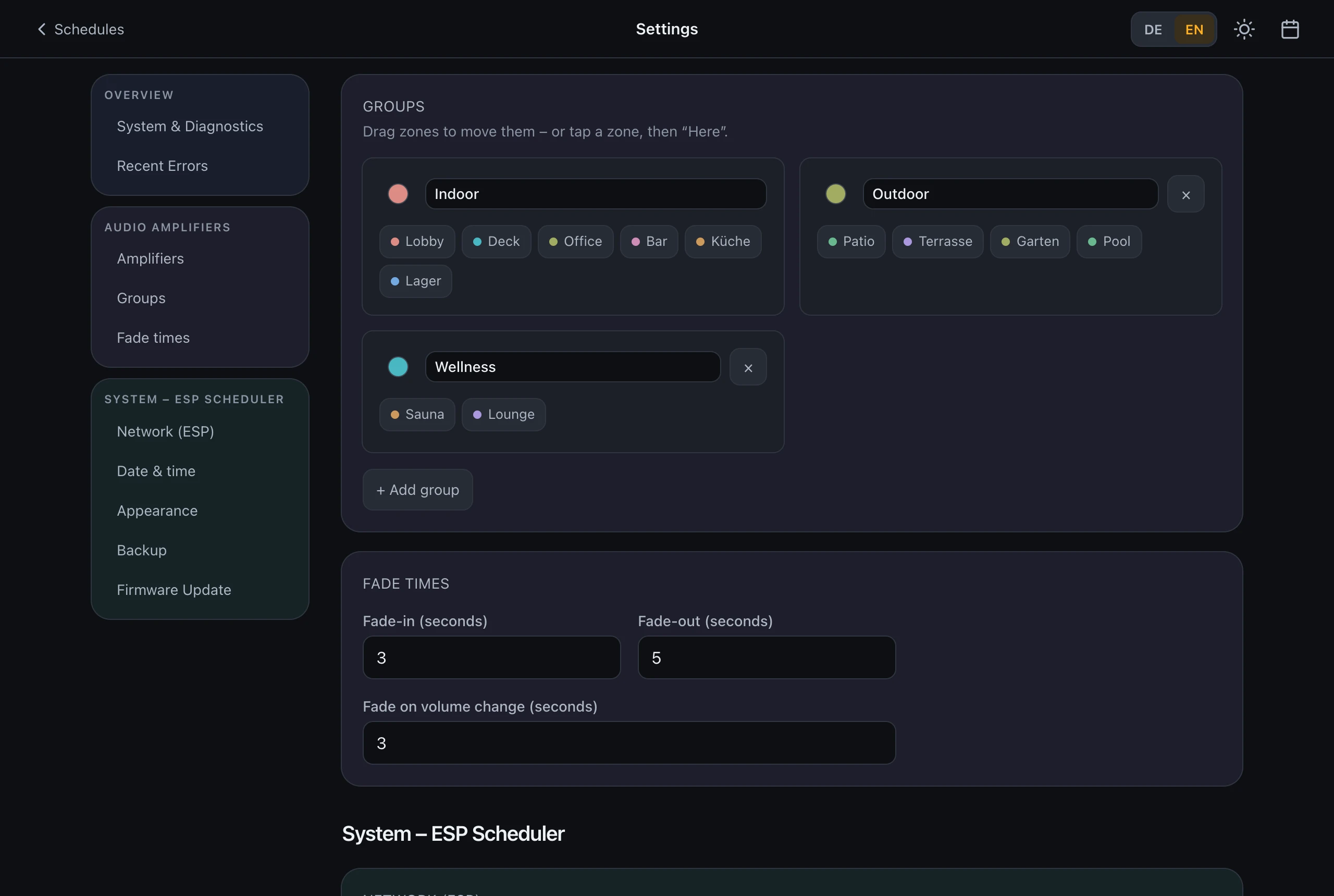
Zone groups
Sort zones into named, colour-coded groups, also across amplifiers — drag and drop, or tap and "Here" on a phone. A switch on the schedule page shows one group at a time.
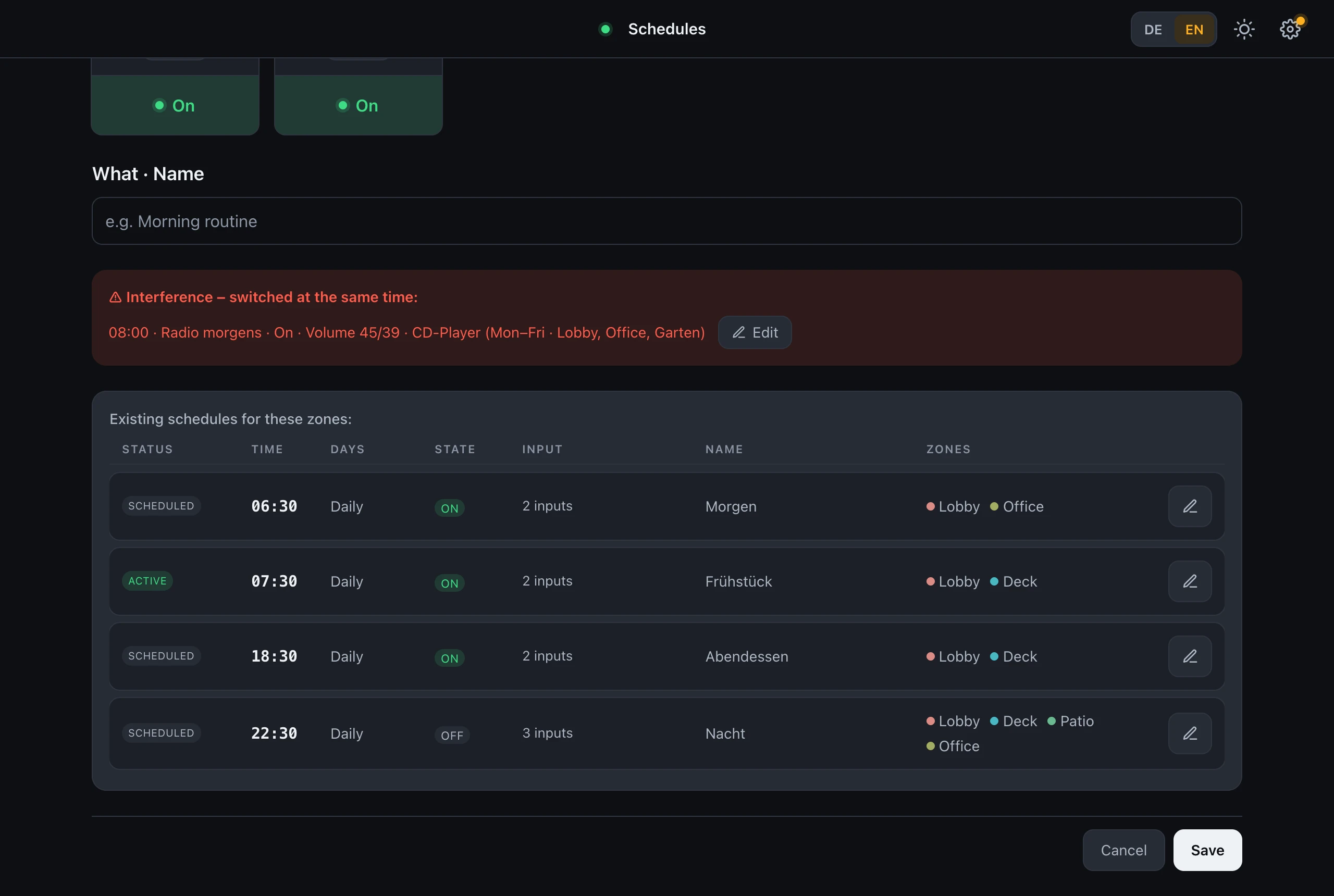
Conflict detection
Overlapping events are flagged before they can silently overwrite each other.
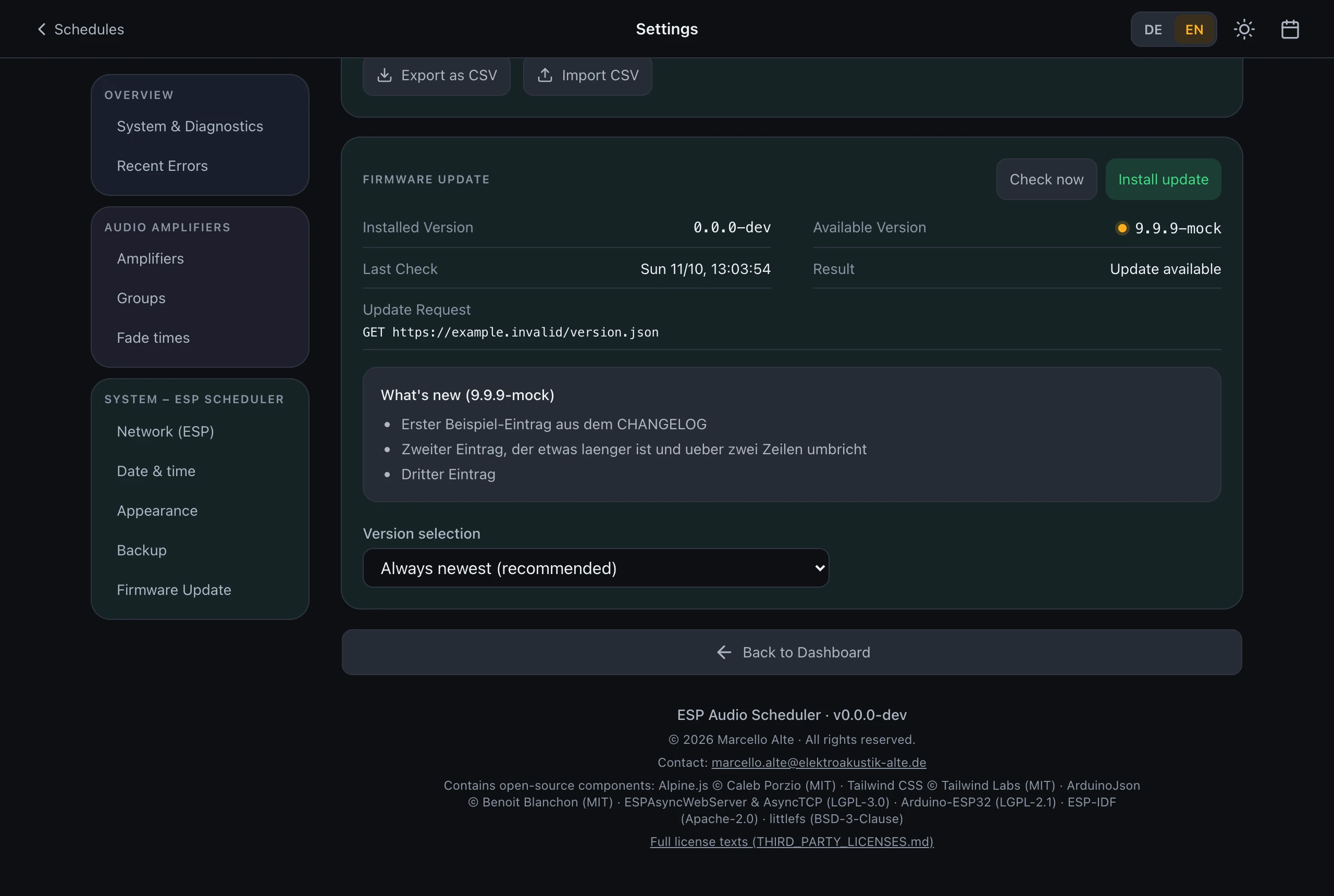
Firmware
Reports new versions, installs them only at the push of a button and rolls back automatically if one fails to boot.
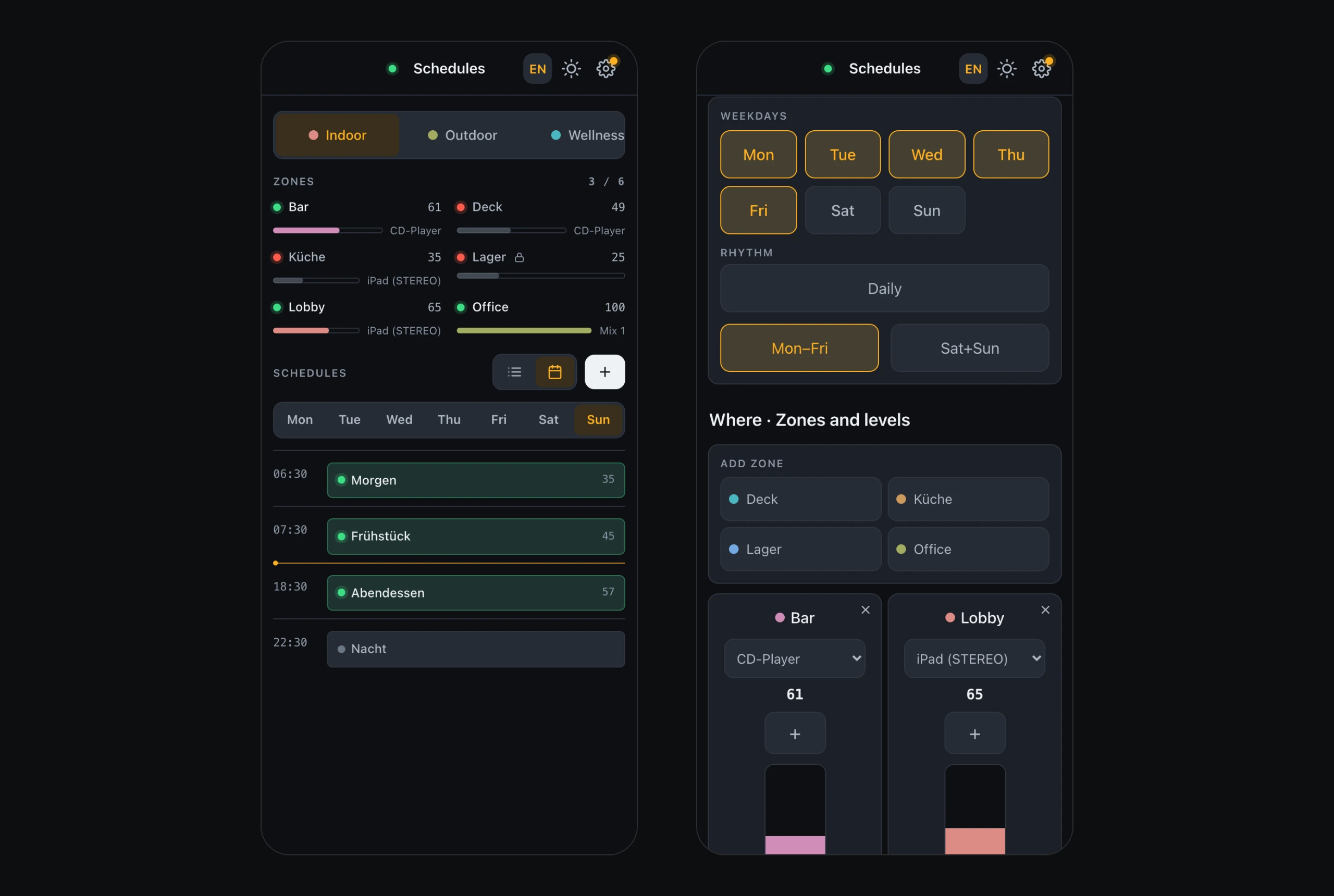
On the phone
Group switch, two zones side by side and a compact layout that leaves room for the content.
The real web UI of the current firmware, running on sample data in your browser.
Specifications
Technical data
| Hardware | ESP32 module with Ethernet (Olimex ESP32-POE-ISO) |
|---|---|
| Power | PoE IEEE 802.3af or 5V via USB |
| Network | Ethernet 10/100 Mbit/s, IPv4; DHCP, static IP, or DHCP-fallback address |
| Amplifier protocol | Pascal Audio "Open API for Installers", TCP port 7621; mDNS discovery |
| Compatible amplifiers | Any multi-zone amplifier that speaks that protocol — Pascal, Blaze and Sonance installation models |
| Amplifiers | Up to 4 per scheduler |
| Zones | Up to 8 per amplifier (A–H), detected automatically per amplifier model; organized in groups, also across amplifiers |
| Events | Up to 100, minute-precise, weekday-based |
| Time base | NTP, incl. daylight-saving; manual clock as fallback |
| Updates | OTA via HTTPS (GitHub releases), installed at the push of a button; automatic rollback on failed boot |
Full details, setup and troubleshooting are in the manual.
Questions
Frequently asked questions
Does Blaze PowerZone Control support scheduling?
No — Blaze's own PowerZone Control app (and Pascal's ZoneController) handle DSP configuration, zone setup and live wall-panel volume control, but neither includes time-based weekly scheduling. The ESP Audio Scheduler adds that missing piece on top of your existing amplifier, no replacement hardware needed.
Does it work with Sonance amplifiers?
Yes. Sonance multi-zone installation amplifiers use the same Pascal Audio control protocol as Pascal and Blaze models, so the scheduler discovers and controls them the same way — no separate firmware or adapter.
Can one scheduler control several amplifiers?
Yes, up to four. Each amplifier gets its own card in the settings, and the zones of all amplifiers can be sorted into groups, also across amplifiers. A group switch on the schedule page shows one group at a time. A schedule still switches individual zones; the groups keep the zone list organized.
How do I automatically turn off background music at closing time?
Create an event in the web UI with your closing time, select the zones, switch them off, and set a fade-out time. From then on it fires automatically every matching weekday — no computer or app needs to stay open.
Can I schedule volume changes on a Pascal amplifier?
Yes. Each event can set a target volume per zone in addition to on/off, with its own fade time, so volume changes ramp smoothly instead of jumping.
What happens if the scheduler loses power or network?
It won't fire any events without a valid clock — if power or network drops and NTP can't sync, it deliberately stays silent instead of switching at the wrong time, then resumes on schedule automatically once time syncs again.
Order
Ready to stop switching zones by hand?
One device runs up to four amplifiers. It ships flashed, tested and ready to plug into your network.
- ESP32-PoE-ISO, flashed and tested
- Full manual and setup guide
- Free over-the-air firmware updates
- Direct support from the developer
Availability
On request
Email to orderBuilt and shipped from Germany. The email opens with a few questions filled in — answer what you can and we reply with price and lead time.